Utilizing the account abstraction feature of the CLI for Sponsored Transactions
This tutorial will guide you through utilizing the account abstraction (AA) feature of the CLI to interact with your application while testing locally.
Introduction
Better user experience has become a major focus for blockchain protocols, infrastructures teams and applications developers. Over the last couple of years we've had several EIP's targeted at offering better user experience through various methods, of which the most impactful of these EIP's is EIP 4337 (Account Abstraction).
EIP 4337 introduces a new application-layer architecture that enables features like sponsored transactions, transaction batching, partially funding or even funding gas fees using tokens other than ETH. This unlocks a much smoother onboarding experiences and reduces friction for end users.
We currently have various architectures and SDKs supporting account abstraction across multiple chains, but there’s currently very few solutions dedicated to testing this integration locally during application development.
The Cartesi CLI fixes this by integrating an account abstraction infrastructure for testing the AA functionality of your Cartesi application on your local machine. It currently supports sponsored transactions and passkey-based authentication, making it possible to experiment with real-world AA features before deploying.
This local AA environment relies on external SDKs from popular account abstraction providers such as Alchemy, Biconomy and ZeroDev. Because the CLI uses the same underlying SDKs, the behavior you see locally should mirror what you'd experience on Mainnet provided you’re using the same provider.
For this tutorial, we’ll focus specifically on sponsored transactions using the ZeroDev SDK, but you can easily adapt the approach for other providers like Alchemy or Biconomy.
Architecture
The architecture of the CLI implementation for account abstraction is pretty much the same as that of mainnet and testnet applications; the only difference is that the CLI deploys and manages some important contracts once you start your local Anvil network by running the cartesi run command and adding the paymaster and bundler to the service flag. What this means is that you don't need to bother yourself with building and deploying these important contracts; you simply utilize any SDK or account abstraction framework to interact with these contracts as you would on mainnet or testnet.
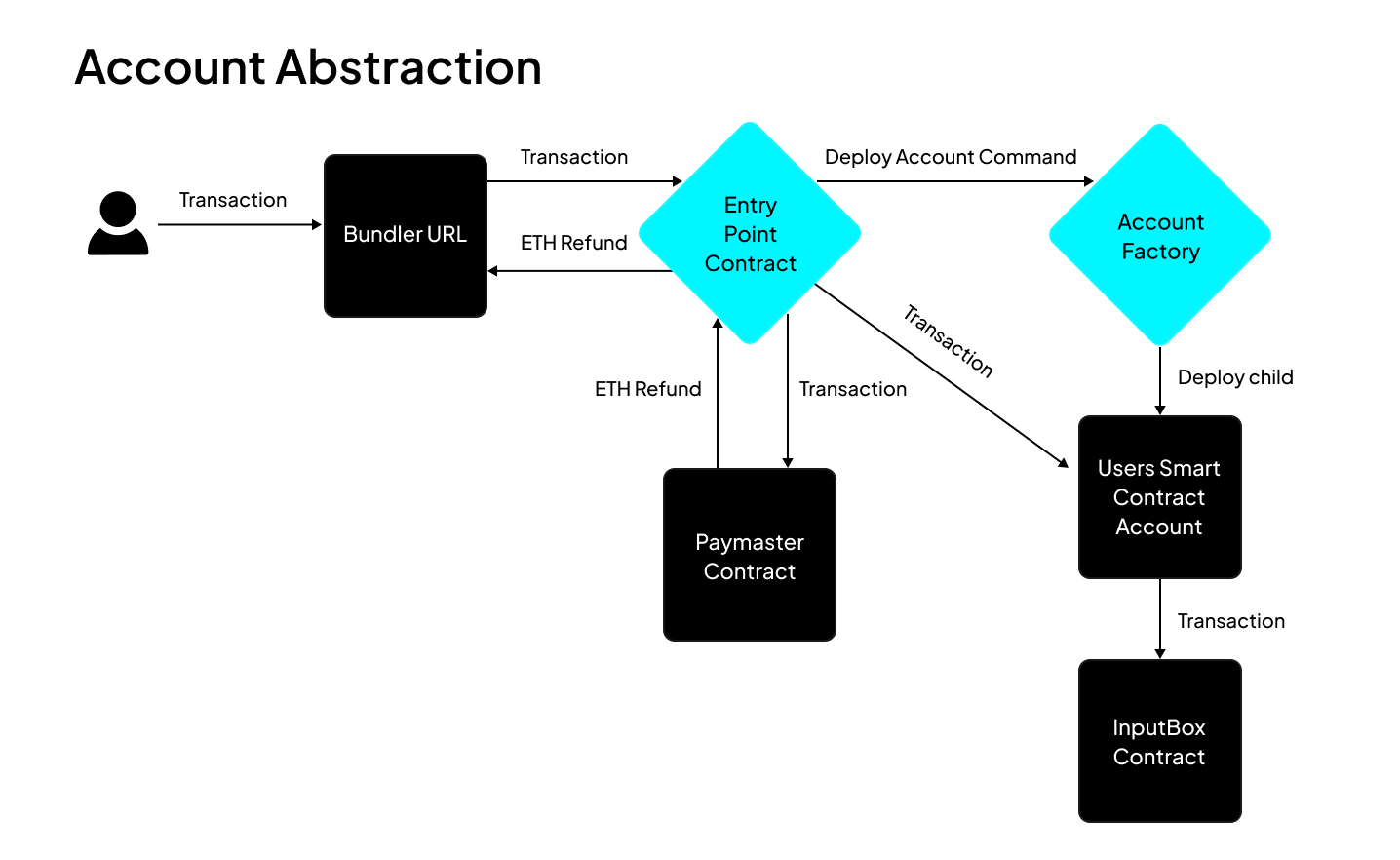
From the architecture above, transactions from the frontend are sent to the bundler URL, which controls a private key with which it pays for these transactions and sends them to the entrypoint contract. This entrypoint contract is a universal contract that forwards all transactions to the paymaster and also to the user's smart contract wallet if the user has one; if the user doesn't, it calls the account factory to deploy a smart wallet for the user. The paymaster refunds the gas fees for the execution, while the user’s smart wallet submits the transactions to the input box contract.
You can view the addresses for some of these components, like the account factory, entrypoint address, paymaster, etc., by running the command cartesi address-book. While the bundler and paymaster URL are displayed once you start your Cartesi application using the cartesi run --services bundler,paymaster command. Note that for mainnet/testnet integration, you’ll have to replace these with the respective URLs provided by the SDK you’re using.
Setting up the frontend environment
We’ll be using React.js along with Wagmi to build this simple frontend application. We’ll also be relying heavily on some other dependencies that we’ll introduce later on.
To bootstrap a React project with Wagmi already configured, we’ll use the CLI command
npm create wagmi@latest
This command would create a new React application with a simple UI and wallet connect by wagmi already integrated.
Next, we install other dependencies we would be using by running this code in the terminal:
npm i permissionless@0.2.47 viem@2.28.0 @zerodev/sdk@5.4.36 @zerodev/ecdsa-validator@5.4.8
This command installs four different dependencies this project will be utilizing. Permissionless, and the two zerodev dependencies can be replaced with the packages for any other AA SDK you decide to use. For this tutorial we’ll be using zerodev, and as such, we’ve installed the zerodev sdk and the ecdsa-validator dependencies.
Configuring wagmi.ts file
Congratulations on successfully bootstrapping a new frontend repo; next we’ll need to properly configure a wagmi client to work on localhost. Once you’re ready for mainnet or testnet, then you can update this configuration to work with any chain you intend to support. To do this, we CD into the src folder, then replace the contents of the wagmi.ts file with:
import "dotenv/config"
import { defineChain } from 'viem';
import { http, cookieStorage, createConfig, createStorage } from 'wagmi'
import { mainnet, sepolia, cannon } from 'wagmi/chains'
import { coinbaseWallet, injected, walletConnect } from 'wagmi/connectors'

let APPRPC = "http://127.0.0.1:6751/anvil";


export const cartesi = defineChain({
  ...cannon,
  rpcUrls: { default: { http: [APPRPC] } },
});

export function getConfig() {

let projectId = process.env.NEXT_PUBLIC_WC_PROJECT_ID as string;


  return createConfig({
    chains: [cartesi],
    connectors: [
      injected(),
      coinbaseWallet(),
      walletConnect({ projectId }),
    ],
    storage: createStorage({
      storage: cookieStorage,
    }),
    ssr: true,
    transports: {
      [cartesi.id]: http(APPRPC),
    },
  })
}

declare module 'wagmi' {
  interface Register {
    config: ReturnType<typeof getConfig>
  }
}
Set up a zerodev file
Next, we set up an implementation for creating a smart account, paymaster client, and finally a kernelClient for the connected wallet. The client makes use of the paymaster and bundler URL, both of which are provided by the CLI once you start your Cartesi application. The Entrypoint contract version that’s used in the file is provided by the zerodev SDK but its implementation is deployed and managed by the Cartesi CLI.
Since we’re making use of the Zerodev Smart Account client, We’ll name this file zerodev.ts. This file would serve as the main engine for our implementation, its function is to create a ecdsa validator for the wallet connected to our frontend, this validator is bound to the smart wallet that's created, and ensures that only the connected wallet would be able to control the smart wallet. Towards the end of the file we create a kernelAccountClient, this combines the bundler, paymaster and entrypoint contract into a client and abstracts interaction between these three components using already structured implementations by zerodev.
This file should be located inside the src folder and at the same layer as the wagmi.ts file we updated previously.
import "dotenv/config"
import {
  createKernelAccount,
  createKernelAccountClient,
} from "@zerodev/sdk"
import { signerToEcdsaValidator } from "@zerodev/ecdsa-validator"
import { KERNEL_V3_2 } from "@zerodev/sdk/constants"
import {
  entryPoint07Address,
  EntryPointVersion,
} from "viem/account-abstraction"
import { createPimlicoClient } from "permissionless/clients/pimlico";
import { createPaymasterClient } from "viem/account-abstraction";
import { Address, createPublicClient, http } from "viem"
import {cartesi} from "./wagmi"

let BUNDLER_URL = "http://127.0.0.1:6751/bundler/rpc";
let PAYMASTER_URL = "http://127.0.0.1:6751/paymaster/";
let APPRPC = "http://127.0.0.1:6751/anvil";
let chain = cartesi;


export const useSmartAccountClient = async (walletClient: any) => {

    const originalKernelVersion = KERNEL_V3_2

    const publicClient = createPublicClient({
        chain,
        transport: http(APPRPC),
    })

    const entryPoint = {
        address: entryPoint07Address as Address,
        version: "0.7" as EntryPointVersion,
    }

    const signer = walletClient;

    if (!signer) {
        throw new Error("Wallet client (signer) is undefined");
    }

    const ecdsaValidator = await signerToEcdsaValidator(publicClient, {
        signer,
        entryPoint,
        kernelVersion: originalKernelVersion,
    })

    const account = await createKernelAccount(publicClient, {
        plugins: {
          sudo: ecdsaValidator,
        },
        entryPoint,
        kernelVersion: originalKernelVersion,
    })


    const estimateFeesPerGas: any = async () => {
        const pimlicoClient = createPimlicoClient({
            transport: http(BUNDLER_URL),
        });
        const gas = await pimlicoClient.getUserOperationGasPrice();
        return gas.standard;
    };


    const paymasterClient = createPaymasterClient({
      transport: http(PAYMASTER_URL),
    })


  const kernelClient = createKernelAccountClient({
    account,
    chain,
    bundlerTransport: http(BUNDLER_URL),
    userOperation: { estimateFeesPerGas },
    client: publicClient,
    paymaster: paymasterClient,
  })


    return kernelClient;
}
The Paymaster and Bundler URL contained in the code block above is the paymaster and bundler URL obtained from the Cartesi CLI, therefore you should replace them with the URL's obtained on your end, while for testnet or mainnet environment, you replace them with the URL's from a provider of your choice.
Set up the Cartesi Client
We’ll need to set up is a Cartesi client page. This is responsible for interacting with the kernelClient that was created in the Zerodev file from the previous section. It would utilize the kernel client to structure and relay transactions to the input box; it receives the argument to be sent to the Cartesi Application and the connected walletClient as function arguments, then uses the kernelClient to build and sponsor and relay the received arguments to the input box contract. We’ll create this file also in the src folder, then call it cartesi.ts.
import { Address, encodeFunctionData, Hash, Hex, parseAbi } from "viem";
import { useSmartAccountClient } from "./zerodev";


export const useInputBoxAddInput = async (args: Hex, walletClient: any) => {
    let INPUTBOXADDRESS = '0xc70074BDD26d8cF983Ca6A5b89b8db52D5850051' as Address;
    let APPADDRESS = '0xa083af219355288722234c47d4c8469ca9af6605' as Address;

    const smartAccountClient = await useSmartAccountClient(walletClient);
    console.log("printing useSmartAccountClient");
    console.log(smartAccountClient);
    const inputBoxABI = parseAbi([
        "function addInput(address appContract, bytes calldata payload) external returns (bytes32)",
    ]);

    const userOpHash = await smartAccountClient.sendUserOperation({
        callData: await smartAccountClient.account.encodeCalls([{
            to: INPUTBOXADDRESS,
            value: BigInt(0),
            data: encodeFunctionData({
              abi: inputBoxABI,
              functionName: "addInput",
              args: [APPADDRESS, args],
            }),
          }]),
    });
    const _receipt = await smartAccountClient.waitForUserOperationReceipt({
        hash: userOpHash,
    })
    let _hash = _receipt.receipt.transactionHash as Hash;

    return _hash;

};
The Inputbox and App address contained in the above code snippet are also for a local application instance, therefore if your application address on devnet is different, you should replace the code content as required, while for testnet or mainnet you replace the application address with that of your application and also update the inputbox address with the Cartesi inputbox address for your deployment chain.
Set Up the Frontend UI
At this point, we have a complete Smart Account client active, and this is ready to relay transactions to the input box contract. However, one crucial part is missing, which is a user interface for users to be able to pass in any arbitrary payload of their choice to the Cartesi application running on the local machine. For this, we’ll CD into the app folder, then replace the contents of page.tsx with:
"use client";
import { useEffect, useState } from "react";
import { isHex, stringToHex } from "viem";
import {
  useAccount,
  useBlockNumber,
  useConnect,
  useDisconnect,
  useWalletClient,
} from "wagmi";
import { useInputBoxAddInput } from "@/cartesi";
import { useSmartAccountClient } from "../zerodev";

function App() {
  const account = useAccount();
  const { connectors, connect, status, error } = useConnect();
  const { disconnect } = useDisconnect();
  const { data: blockNumber } = useBlockNumber({ watch: true });

  const [usePaymaster, setUsePaymaster] = useState<boolean>(true);
  const [isSubmitting, setIsSubmitting] = useState<boolean>(false);

  const [payload, setPayload] = useState<string>("hello");

  const { data: walletClient } = useWalletClient();

  const sunmitUserOp = async () => {
    setIsSubmitting(true);
    let hexPayload = isHex(payload) ? payload : stringToHex(payload);
    await useInputBoxAddInput(hexPayload, walletClient);
    window.alert(
      "Transaction submitted to application. Check your node logs for more details"
    );
    setIsSubmitting(false);
  };

  const [smartAccountClient, setSmartAccountClient] = useState<any>(null);

  useEffect(() => {
    const fetchSmartAccountClient = async () => {
      const client = await useSmartAccountClient(walletClient);
      setSmartAccountClient(client);
    };
    fetchSmartAccountClient();
  }, [walletClient]);

  return (
    <>
      <div>
        <h2>Account (Signer)</h2>

        <div>
          status: {account.status}
          <br />
          addresses: {JSON.stringify(account.addresses)}
          <br />
          chainId: {account.chainId}
          <br />
          blockNumber: {blockNumber?.toString()}
        </div>

        {account.status === "connected" && (
          <button type="button" onClick={() => disconnect()}>
            Disconnect
          </button>
        )}
      </div>

      <div>
        <h2>Connect</h2>
        {connectors.map((connector) => (
          <button
            key={connector.uid}
            onClick={() => connect({ connector })}
            type="button"
          >
            {connector.name}
          </button>
        ))}
        <div>{status}</div>
        <div>{error?.message}</div>
      </div>

      <div>
        <h2>Account Abstraction</h2>
        <div>
          Smart Account Address:
          <text>{smartAccountClient?.account.address}</text>
        </div>
      </div>

      <div>
        <h2>Transaction</h2>
        <div>
          payload:
          <input value={payload} onChange={(e) => setPayload(e.target.value)} />
        </div>
        <input
          type="checkbox"
          id="usePaymaster"
          checked={usePaymaster}
          onChange={() => setUsePaymaster(!usePaymaster)}
        />
        <label htmlFor="usePaymaster">Use Paymaster</label>
        <br />
        <button onClick={sunmitUserOp} disabled={isSubmitting}>
          Send Input
        </button>
      </div>
    </>
  );
}

export default App;
We now have a functional frontend and account abstraction infrastructure available to interact with your Cartesi application running on localhost. But to complete this tutorial, we’ll need to set up and run a demo Cartesi application, as this will deploy all the necessary contracts like the entrypoint contract, relayer contract, smart account factory, and the necessary bundler and paymaster servers, without these we won't be able to interact with the account abstraction implementation.
Set up and run a Cartesi application backend on localhost
This section of the tutorial is focused on setting up a Cartesi application on a local host; this will be the target of all user executions on the frontend. To do this, we simply run the following commands:.
- Create a new project using the command:
cartesi create AA-on-CLI --template javascript
- Cd into
AA-on-CLI, then build the application by running the command
cartesi build
- Next, run the below command to start a local anvil node and deploy all necessary servers and contracts.
cartesi run --services bundler,explorer,graphql,paymaster,passkey
- Finally, in a new terminal, navigate to our frontend repository and start the frontend by running the command.
npm run dev
Testing the application
To test out the application, we simply visit the page our frontend is running on. We should have a simple UI available with a wallet connect feature and a text box available. First we’ll need to connect our wallet, then after a couple of seconds the frontend displays our smart contract account address; this will be the address that forwards every execution we make to the inputbox contract; therefore, the application on the backend will pick this new address as the sender and not the address we connected initially. Next, we can interact with the application by passing in any generic message of our choice into the text box and then hitting the send input button. This should trigger our connected wallet to display a popup asking us to sign a message (which does not require us to pay gas fees) and not the regular transaction verification request. Once we sign this transaction, the message we typed in will be forwarded to our application running on localhost. You can check the terminal where the application is running to verify that the message got to our application and the actual address that sent the message.
Conclusion
We’ve been able to build our first sponsored transaction supporting application on Cartesi and that’s great. But it’s important to note that the above infrastructure we’ve setup is streamlined to localhost but can easily be configured to work with any network of your choice by simply replacing the bundler URL and also the paymaster URL with that provided by zerodev for the chain you intend to support. You can check the zerodev documentation for more information on how to create an account and also obtain a bundler and paymaster URL.
Access a complete codebase with the code blocks from the tutorial here.