Introduction
The backend of a Cartesi dApp processes requests in the following manner:
-
Finish — Called via
/finish, indicates that any previous processing has been completed and the backend is ready to handle the next request. The subsequent request is returned as the call's response and can be of the following types:-
Advance — Provides input to be processed by the backend to advance the Cartesi Machine state. When processing an Advance request, the backend can call the
/voucher, and/reportendpoints. For such requests, the input data contains both the payload and metadata, including the account address that submitted the input. -
Inspect — Submits a query about the application's current state. When running inside a Cartesi Machine, this operation is guaranteed to leave the state unchanged, as the machine reverts to its exact previous condition after processing. For Inspect requests, the input data contains only a payload, and the backend can only call the
/reportendpoint.
-
-
Exception — Called by the backend when it encounters an unrecoverable error during request processing. This signals to the Rollup HTTP Server that the current request processing failed and should be terminated. See
/exceptionfor more details.
Advance and Inspect
Here is a simple boilerplate application that handles Advance and Inspect requests:
- JavaScript
- Python
- Rust
- Go
- C++
const rollup_server = process.env.ROLLUP_HTTP_SERVER_URL;
console.log("HTTP rollup_server url is " + rollup_server);

async function handle_advance(data) {
  console.log("Received advance request data " + JSON.stringify(data));
  return "accept";
}

async function handle_inspect(data) {
  console.log("Received inspect request data " + JSON.stringify(data));
  return "accept";
}

var handlers = {
  advance_state: handle_advance,
  inspect_state: handle_inspect,
};

var finish = { status: "accept" };

(async () => {
  while (true) {
    const finish_req = await fetch(rollup_server + "/finish", {
      method: "POST",
      headers: {
        "Content-Type": "application/json",
      },
      body: JSON.stringify({ status: "accept" }),
    });

    console.log("Received finish status " + finish_req.status);

    if (finish_req.status == 202) {
      console.log("No pending rollup request, trying again");
    } else {
      const rollup_req = await finish_req.json();
      var handler = handlers[rollup_req["request_type"]];
      finish["status"] = await handler(rollup_req["data"]);
    }
  }
})();
from os import environ
import logging
import requests

logging.basicConfig(level="INFO")
logger = logging.getLogger(__name__)

rollup_server = environ["ROLLUP_HTTP_SERVER_URL"]
logger.info(f"HTTP rollup_server url is {rollup_server}")

def handle_advance(data):
   logger.info(f"Received advance request data {data}")
   return "accept"

def handle_inspect(data):
   logger.info(f"Received inspect request data {data}")
   return "accept"


handlers = {
   "advance_state": handle_advance,
   "inspect_state": handle_inspect,
}

finish = {"status": "accept"}

while True:
   logger.info("Sending finish")
   response = requests.post(rollup_server + "/finish", json=finish)
   logger.info(f"Received finish status {response.status_code}")
   if response.status_code == 202:
       logger.info("No pending rollup request, trying again")
   else:
       rollup_request = response.json()
       data = rollup_request["data"]
       handler = handlers[rollup_request["request_type"]]
       finish["status"] = handler(rollup_request["data"])
use json::{object, JsonValue};
use std::env;

pub async fn handle_advance(
    _client: &hyper::Client<hyper::client::HttpConnector>,
    _server_addr: &str,
    request: JsonValue,
) -> Result<&'static str, Box<dyn std::error::Error>> {
    println!("Received advance request data {}", &request);
    let _payload = request["data"]["payload"]
        .as_str()
        .ok_or("Missing payload")?;
    // TODO: add application logic here
    Ok("accept")
}

pub async fn handle_inspect(
    _client: &hyper::Client<hyper::client::HttpConnector>,
    _server_addr: &str,
    request: JsonValue,
) -> Result<&'static str, Box<dyn std::error::Error>> {
    println!("Received inspect request data {}", &request);
    let _payload = request["data"]["payload"]
        .as_str()
        .ok_or("Missing payload")?;
    // TODO: add application logic here
    Ok("accept")
}

#[tokio::main]
async fn main() -> Result<(), Box<dyn std::error::Error>> {
    let client = hyper::Client::new();
    let server_addr = env::var("ROLLUP_HTTP_SERVER_URL")?;

    let mut status = "accept";
    loop {
        println!("Sending finish");
        let response = object! {"status" => status.clone()};
        let request = hyper::Request::builder()
            .method(hyper::Method::POST)
            .header(hyper::header::CONTENT_TYPE, "application/json")
            .uri(format!("{}/finish", &server_addr))
            .body(hyper::Body::from(response.dump()))?;
        let response = client.request(request).await?;
        println!("Received finish status {}", response.status());

        if response.status() == hyper::StatusCode::ACCEPTED {
            println!("No pending rollup request, trying again");
        } else {
            let body = hyper::body::to_bytes(response).await?;
            let utf = std::str::from_utf8(&body)?;
            let req = json::parse(utf)?;

            let request_type = req["request_type"]
                .as_str()
                .ok_or("request_type is not a string")?;
            status = match request_type {
                "advance_state" => handle_advance(&client, &server_addr[..], req).await?,
                "inspect_state" => handle_inspect(&client, &server_addr[..], req).await?,
                &_ => {
                    eprintln!("Unknown request type");
                    "reject"
                }
            };
        }
    }
}
package main

import (
	"dapp/rollups"
	"encoding/json"
	"fmt"
	"io"
	"log"
	"os"
	"strconv"
)

var (
	infolog = log.New(os.Stderr, "[ info ]  ", log.Lshortfile)
	errlog  = log.New(os.Stderr, "[ error ] ", log.Lshortfile)
)

func HandleAdvance(data *rollups.AdvanceResponse) error {
	dataMarshal, err := json.Marshal(data)
	if err != nil {
		return fmt.Errorf("HandleAdvance: failed marshaling json: %w", err)
	}
	infolog.Println("Received advance request data", string(dataMarshal))
	return nil
}

func HandleInspect(data *rollups.InspectResponse) error {
	dataMarshal, err := json.Marshal(data)
	if err != nil {
		return fmt.Errorf("HandleInspect: failed marshaling json: %w", err)
	}
	infolog.Println("Received inspect request data", string(dataMarshal))
	return nil
}

func Handler(response *rollups.FinishResponse) error {
	var err error

	switch response.Type {
	case "advance_state":
		data := new(rollups.AdvanceResponse)
		if err = json.Unmarshal(response.Data, data); err != nil {
			return fmt.Errorf("Handler: Error unmarshaling advance: %w", err)
		}
		err = HandleAdvance(data)
	case "inspect_state":
		data := new(rollups.InspectResponse)
		if err = json.Unmarshal(response.Data, data); err != nil {
			return fmt.Errorf("Handler: Error unmarshaling inspect: %w", err)
		}
		err = HandleInspect(data)
	}
	return err
}

func main() {
	finish := rollups.FinishRequest{Status: "accept"}

	for {
		infolog.Println("Sending finish")
		res, err := rollups.SendFinish(&finish)
		if err != nil {
			errlog.Panicln("Error: error making http request: ", err)
		}
		infolog.Println("Received finish status ", strconv.Itoa(res.StatusCode))

		if res.StatusCode == 202 {
			infolog.Println("No pending rollup request, trying again")
		} else {

			resBody, err := io.ReadAll(res.Body)
			if err != nil {
				errlog.Panicln("Error: could not read response body: ", err)
			}

			var response rollups.FinishResponse
			err = json.Unmarshal(resBody, &response)
			if err != nil {
				errlog.Panicln("Error: unmarshaling body:", err)
			}

			finish.Status = "accept"
			err = Handler(&response)
			if err != nil {
				errlog.Println(err)
				finish.Status = "reject"
			}
		}
	}
}
#include <stdio.h>
#include <iostream>

#include "3rdparty/cpp-httplib/httplib.h"
#include "3rdparty/picojson/picojson.h"

std::string handle_advance(httplib::Client &cli, picojson::value data)
{
    std::cout << "Received advance request data " << data << std::endl;
    return "accept";
}

std::string handle_inspect(httplib::Client &cli, picojson::value data)
{
    std::cout << "Received inspect request data " << data << std::endl;
    return "accept";
}

int main(int argc, char **argv)
{
    std::map<std::string, decltype(&handle_advance)> handlers = {
        {std::string("advance_state"), &handle_advance},
        {std::string("inspect_state"), &handle_inspect},
    };
    httplib::Client cli(getenv("ROLLUP_HTTP_SERVER_URL"));
    cli.set_read_timeout(20, 0);
    std::string status("accept");
    std::string rollup_address;
    while (true)
    {
        std::cout << "Sending finish" << std::endl;
        auto finish = std::string("{\"status\":\"") + status + std::string("\"}");
        auto r = cli.Post("/finish", finish, "application/json");
        std::cout << "Received finish status " << r.value().status << std::endl;
        if (r.value().status == 202)
        {
            std::cout << "No pending rollup request, trying again" << std::endl;
        }
        else
        {
            picojson::value rollup_request;
            picojson::parse(rollup_request, r.value().body);
            picojson::value metadata = rollup_request.get("data").get("metadata");
            auto request_type = rollup_request.get("request_type").get<std::string>();
            auto handler = handlers.find(request_type)->second;
            auto data = rollup_request.get("data");
            status = (*handler)(cli, data);
        }
    }
    return 0;
}
An Advance request involves sending input data to the base layer via JSON-RPC, allowing it to reach the dApp backend to change the application's state.
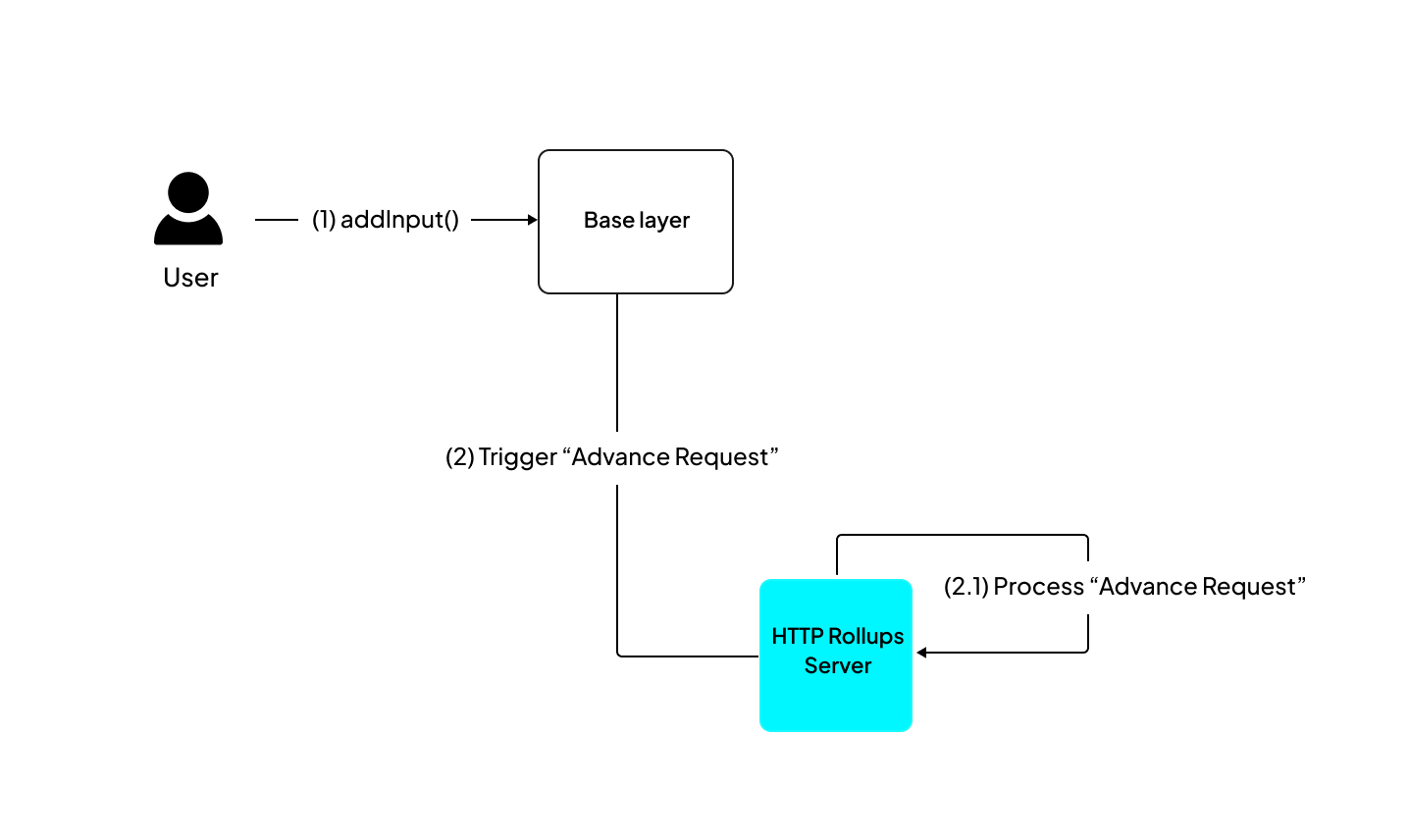
Here is how an advance request works in the dApp architecture:
-
Step 1: Send an input to the
addInput(address, bytes)function of the InputBox smart contract. -
Step 2: The HTTP Rollups Server reads the data and sends it to the Cartesi Machine for processing.
-
Step 3: After computation, the machine state is updated, and the results are returned to the rollup server.
An Inspect request involves making an external HTTP API call to the rollups server to read the dApp state without modifying it.
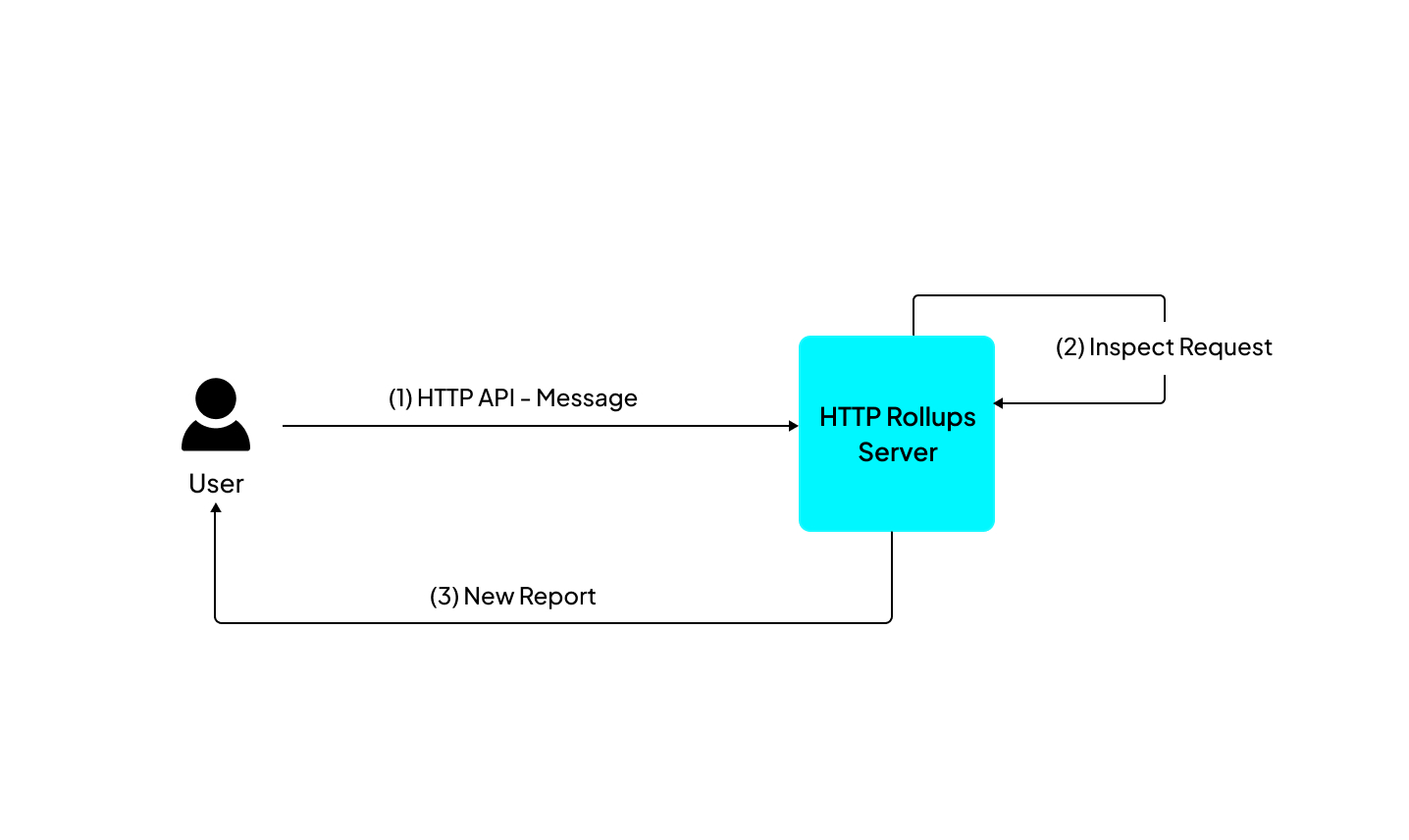
You can make a simple inspect call from your frontend client to retrieve reports.
To perform an Inspect call, make a HTTP POST request to <address of the node>/inspect/<application name> with a payload in the request body. For example:
curl -X POST http://localhost:8080/inspect/<application name> \
    -H "Content-Type: application/json" \
    -d '{"payload": "0xdeadbeef"}'
The payload should be a hex-encoded string starting with '0x' followed by pairs of hexadecimal numbers.
After receiving the call's response, the payload is extracted from the response data, allowing the backend code to examine it and produce outputs as reports.
The direct output types for Advance requests are vouchers, notices, and reports, while Inspect requests generate only reports.